A Responsive Blogger Website, That Take my blog to the next level.

I am a Software Developer, Learning and experementing with .Net Technology and try to put my Learning altogether here.


We have all sections related to .Net Technology, like .Net-C#, Asp.Net, MVC, jQuery, AngularJs, Sharepoint. Find out more...


Following are the some of the Advantages of using this Web site :-

  • Get Update about latest in .Net world.
  • Collection of Useful, Frequently used .Net Solutions.
  • It’s beautiful on every screen size (try resizing your browser!)
Showing posts with label C#. Show all posts
by · No comments :

Let us Learn Tuple-Part1


C#4.0 has introduced a new feature call Tuple.In this article we will start learning about Tuple, how to create it,when to use Tuple and how to access Tuple.

Introduction

C#4.0 has introduced a new feature call Tuple. In this article we will start learning about Tuple, how to create it, when to use Tuple and how to access Tuple. This is a series of articles on Tuples and you can read the entire series of article as listed down
Let us Learn Tuple-Part1
Let us Learn Tuple-Part2 ( Creation of Generic Collections and Accessing the same using Tuple )
Let us Learn Tuple-Part3 ( Tuple and Arrays )
Let us Learn Tuple-Part4 ( Create MultiKey dictionary using Tuple )
Let us Learn Tuple-Part5 ( LAMBDA with Tuple )
Let us Learn Tuple-Part6 (Tuple Serialization and DeSerialization)
Let us Learn Tuple-Part7 (Last but not the least part)
(A)What is Tuple?
Tuple is an ordered sequence data structure, introduced in C#4.0, that holds heterogeneous objects. It is represented both as an instance class as well as a static class that uses a static method call Create to create item(s) at runtime. The items(s) created by the Create method is also a Tuple. In other words, the Create static method of the Tuple static class returns an instance of a Tuple.
The Create method has eight(8) overloaded method as shown under
public static class Tuple  {  public static Tuple<T1> Create<T1>(T1 item1);  public static Tuple<T1, T2> Create<T1, T2>(T1 item1, T2 item2);  public static Tuple<T1, T2, T3> Create<T1, T2, T3>(T1 item1, T2 item2, T3 item3);  public static Tuple<T1, T2, T3, T4> Create<T1, T2, T3, T4>(T1 item1, T2 item2, T3 item3, T4 item4);  public static Tuple<T1, T2, T3, T4, T5> Create<T1, T2, T3, T4, T5>(T1 item1, T2 item2, T3 item3, T4 item4, T5 item5);  public static Tuple<T1, T2, T3, T4, T5, T6> Create<T1, T2, T3, T4, T5, T6>(T1 item1, T2 item2, T3 item3, T4 item4, T5 item5, T6 item6);  public static Tuple<T1, T2, T3, T4, T5, T6, T7> Create<T1, T2, T3, T4, T5, T6, T7>(T1 item1, T2 item2, T3 item3, T4 item4, T5 item5, T6 item6, T7 item7);  public static Tuple<T1, T2, T3, T4, T5, T6, T7, Tuple<T8>> Create<T1, T2, T3, T4, T5, T6, T7, T8>(T1 item1, T2 item2, T3 item3, T4 item4, T5 item5, T6 item6, T7 item7, T8 item8);  }  
As can be figure out that, the last argument is again another tuple. This clearly reveals that we can add another tuple item in the 8th argument.
It resides under the System namespace.
(B)Why Tuple?
We know that any called function returns a single value. However, there are times where we may need to return multiple values to the calling function. Tuple precisely serves that purpose.
Let us observe the above statement with an example.
static Tuple<List<int>, List<int>> GetEvenOddNumbers()  {      var numbers = Enumerable.Range(1, 20); //generate numbers between 1 to 20      return           Tuple          .Create          (            numbers.Where(i=>i%2==0).ToList() //find even numbers list            , numbers.Where(i => i % 2 != 0).ToList() //find odd numbers list          );  }  
In the above function, we are generating a series of numbers between 1 to 20 and then segregating the even and odd numbers list and finally returning the same by using Tuple. We can figure out that, the Tuple returns two values of type List<int>, List<int>.This indicates that, the function GetEvenOddNumbers() is capable of returning more than one value to the calling function.
(C)When to use Tuple?
Tuples finds it's usage in multiple places. Some of them are listed below
1. Return multiple values from a method or function
In earlier versions of dotnet(before 4.0), we can achive to return multiple values from a function by using OUT parameters e.g
class MainClass  {          public static void Main(string[] args)          {              var evenNumList = new List<int>();              var oddNumList = new List<int>();                GetEvenOddNumbersUsingOutParameters(out evenNumList, out oddNumList);                        }            private static void GetEvenOddNumbersUsingOutParameters(out List<int> evenNumList,                                                                   out List<int> oddNumList)          {              var numbers = Enumerable.Range(1, 20); //generate numbers between 1 to 20              evenNumList = numbers.Where(i => i % 2 == 0).ToList();              oddNumList  = numbers.Where(i => i % 2 != 0).ToList();          }            }   
Some disadvantages of the above program can be listed as under
  1. Declaration and initialization of extra variables which on the other hand indicates more space complexity and unnecessary object creation.
  2. Using OUT parameter breaks the Single Responsibility Principle
  3. It is slower to access since it involves double indirection problem.
For a better design perspective, we can create a Custom class and use it to return multiple values from a function. But this approach has it's own limitation as it may not be equally feasible all the time to do so and moreover can cause extra code size.
Another approach can be a collection like Dictionary, HashTable or ArrayList but again a seek time for the look-up is involve
And the most common disadvantage to all of the above approach is that they are not thread safe since they are instance members of some kind as opposed to Tuple since it is static and so are it's member(s)
2. Passing multiple values from calling function to a called function
Let us consider the below example
public static void Main(string[] args)  {                           var names = new List<string>() { "Name1", "Name2", "Name3", "Name4" };              var index = new List<int>() { 1, 2, 3, 4 };              var nameIndexTuple  = new Tuple<List<string>, List<int>>(names, index);              ShowItemPosition(nameIndexTuple);             }    private static void ShowItemPosition(Tuple<List<string>, List<int>> nameIndexTuple)  {                  //do something interesting  }  
In the above program, we have created a string and integer collection of items, bundled them inside a Tuple and finally passing them as a single parameter to the called function ShowItemPosition.
We can also achieve the same by using the above describe methods but again with the same disadvantage. Params can serve the purpose but it has it's own limitation since an array is a collection of same type. We can, however, create an object datatype param but it will be tedious to read and manipulate as it involves a huge boxing and unboxing.
Tuple on the other hand, is much more cleaner approach.
(D)How to create Tuple in C#?
We can create Tuple in one of the two below listed ways
  1. By creating a class instance of Tuple Class
    E.g.
    Tuple<string, int, List<string>> studentTupleInstance = new Tuple<string, int, List<string>>(      "Rajlaxmi", 4      , new List<string> { "Mathematics","English","Science and Social Science","Hindi"     });                    
    In the above example we have created an instance (studentTupleInstance) of the Tuple class which contains a string (Student Name),an integer (Student age) and a collection of string (Collection of Subjects). This is an example of 3-Tuple or Triple.
  2. By using the static Create method of Tuple Class
    E.g.
    Tuple<string, int, List<string>> studentTupleCreateMethod = Tuple.Create(        "Rajlakshmi", 4,          new List<string> { "Mathematics","English",                                            "Science and Social Science","Hindi"                                          });                    
    In the above example we have created the Tuple (studentTupleCreateMethod) by using the static Create method of the Tuple class which contains a string (Student Name),an integer (Student age) and a collection of string (Collection of Subjects).
(E)How to access Tuple in C#?
Accessing the items of Tuples as very simple. Tuples items or properties are of Generic Types and henceforth, they don't have any concrete names. In-order to access the Tuple items, we need to invoke the dot (.) operator preceded by the Tuple name as shown below


In the above figure, Item1 represents the first item of the Tuple ((Student Name) which is of type string.

The second item (Student age)is of type int and the last one (Collection of Subjects) is of List<string>.

Being generic, it reduced the overhead of boxing and unboxing which could be on the other hand a tedious task with Objects or Dynamics

References

Tuple Class
An introduction to Tuple

Conclusion

In this introductory article with Tuple, we learnt about What a Tuple is Why we need Tuple, When to use it, How to create Tuple and How to access the same in C#. Hope this will be helpful. More to come in the following series. Zipped file attached.

Inoreader is a light and fast RSS Reader. Follow us on Twitter and Facebook.
Read More
by · No comments :

C# in Depth: C# and beforefielinit


Via Web page
Think you can predict exactly when initialization happens in C#? It's more complicated than you may expect...
Please note that all results here are ones which I have seen, on some (now-unspecified) combination of the C# compiler and CLR. You may observe different behaviour which still follows what the specification guarantees. With the ever-growing combination of platforms and implementations, there's not much point in trying to be exhaustive.

The differences between static constructors and type initializers

Some implementations of the singleton pattern rely on the behaviour of static constructors and type initializers, in particular with respect to the time at which they are invoked.
The C# specification states:
The static constructor for a class executes at most once in a given application domain. The execution of a static constructor is triggered by the first of the following events to occur within an application domain:
  • An instance of the class is created.
  • Any of the static members of the class are referenced.
The CLI specification (ECMA 335) states in section 8.9.5:
  1. A type may have a type-initializer method, or not.
  2. A type may be specified as having a relaxed semantic for its type-initializer method (for convenience below, we call this relaxed semantic BeforeFieldInit)
  3. If marked BeforeFieldInit then the type's initializer method is executed at, or sometime before, first access to any static field defined for that type
  4. If not marked BeforeFieldInit then that type's initializer method is executed at (i.e., is triggered by):
    • first access to any static or instance field of that type, or
    • first invocation of any static, instance or virtual method of that type
The C# specification implies that no types with static constructors should be marked with the beforefieldinit flag. Indeed, this is upheld by the compiler, but with a slightly odd effect. I suspect many programmers believe (as I did for a long time) that the following classes were semantically equivalent:
class Test
{
    static object o = new object();
}
class Test
{
    static object o;
    static Test()
    {
        o = new object();
    }
}
The two classes are not, in fact, the same. They both have type initializers - and the two type initializers are the same. However, the first does not have a static constructor, whereas the second does. This means that the first class can be marked as beforefieldinit and have its type initializer invoked at any time before the first reference to a static field in it. The static constructor doesn't even have to do anything. This third class is equivalent to the second:
class Test
{
    static object o = new object();
    static Test()
    {
    }
}
I believe this is a source of significant confusion - particularly in terms of singleton implementations.

The curious nature of beforefieldinit - lazy or not?

The beforefieldinit flag has a strange effect, in that it can not only mean that a type initializer is invoked earlier than that of an equivalent type without the flag - it could even be invoked later, or not at all. Consider the following program:
using System;
class Test
{
    public static string x = EchoAndReturn ("In type initializer");
    public static string EchoAndReturn (string s)
    {
        Console.WriteLine (s);
        return s;
    }
}
class Driver
{
    public static void Main()
    {
        Console.WriteLine("Starting Main");
     
   &nbs p;    Test.EchoAndReturn("Echo!");
        Console.WriteLine("After echo");
     
        string y = Test.x;
     
        if (y != null)
        {
            Console.WriteLine("After field access");
        }
    }
}
The results of running the above are quite varied. The runtime could decide to run the type initializer on loading the assembly to start with:
In type initializer
Starting Main
Echo!
After echo
After field access
Or perhaps it will run it when the static method is first run...
Starting Main
In type initializer
Echo!
After echo
After field access
Or even wait until the field is first accessed...
Starting Main
Echo!
After echo
In type initializer
After field access
(In theory, the type initializer could even be run after "Echo!" is displayed, but before "After echo" is displayed. I would be very surprised to see any runtime actually show this behaviour, however.) With a static constructor in Test, only the middle of these is possible. So, beforefieldinit can make the invocation of the type initializer even lazier (the last result) or more eager (the first result). I suspect even those developers who know of the existence of beforefieldinit may be surprised by this. The MSDN documentation for TypeAttributes.BeforeFieldInit is particularly poor in this respect. It describes the flag like this:
Specifies that calling static methods of the type does not force the system to initialize the type.
While this is true in the strictest possible sense, it certainly isn't the complete story - it suggests that the flag only makes the initialization lazier, not more eager.
It's worth noting that the v4 CLR behaves differently compared with the v1 and v2 CLRs here - all of them obey they specification, but the v4 CLR is genuinely lazy in many cases where earlier versions are eager.

What should be done?

I propose the following changes:
  • Static field initializers should be treated as if they were part of a static constructor. In other words, any type with a static initializer or an explicit static constructor should not (by default) be marked as beforefieldinit. (Modification to the C# language specification.)
  • There should be a way of overriding this default behaviour in code. An attribute would be a perfectly reasonable solution to this. (Modification to the C# language specification and addition of an attribute to the standard library.)
  • The documentation for TypeAttributes.BeforeFieldInit should be clarified significantly. (Modification to MSDN documentation and ECMA 335.)
The above changes are all entirely backwards-compatible, and require no CLI modification.

Further thoughts (after discussion on newsgroups)

The first of the above proposals is definitely the most controversial. (The last isn't controversial at all, as far as I can see.) The reason is performance. Not many classes actually need the behaviour assumed by many C# programmers - most people need never know the difference, really. The JIT compiler, however, cares quite a lot: if a static member is used within a fairly tight loop, for instance, it makes a lot of sense to initialise the type before entering the loop, knowing thereafter that the type has already been initialised. When code is shared between app domains etc, I gather this becomes even more important.
Making the performance of existing code decrease by recompilation with a new version of the framework would undoubtedly be unpopular. I'm therefore willing to concede as a less-than-ideal proposal - indeed I've only left it in this page for historical reasons (I dislike the idea of being a revisionist).
The second proposal, however, is still important - both to allow classes which do have a static constructor to improve their performance with BeforeFieldInit semantics if appropriate, and to allow classes which currently only need a static constructor to get rid of BeforeFieldInit semantics to achieve this aim in a more self-documenting manner. (A junior developer is more likely to remove a static constructor which appears to be a no-op than to remove an attribute they don't fully understand.)
View on the web
Inoreader is a light and fast RSS Reader. Follow us on Twitter and Facebook.
Read More
by · No comments :

C# in Depth: Overloading


Via Web page
Just as a reminder, overloading is what happens when you have two methods with the same name but different signatures. At compile time, the compiler works out which one it's going to call, based on the compile time types of the arguments and the target of the method call. (I'm assuming you're not using dynamic here, which complicates things somewhat.)
Now, things can get a little bit confusing sometimes when it comes to resolving overloads... especially as things can change between versions. This article will point out some of the gotchas you might run into... but I'm not going to claim it's an authoritative guide to how overloading is performed. For that, read the specification - but be aware that you may get lost in a fairly complex topic. Overloading interacts with things like type inference and implicit conversions (including lambda expressions, anonymous methods and method groups, all of which can become tricky). All specification references are from the C# 4 spec.
This article is also not going to go into the design choices of when it's appropriate and when it's not. I'll give a little advice about when it might be potentially very confusing to use overloading, but anything beyond that will have to wait for another time. I will say that in general I believe overloading should be used for convenience, usually with all overloads ending up calling one "master" method. That's not always the case, but I believe it's the most common scenario which is appropriate.
In each example, I'll give a short program which will declare some methods and call one - and then I'll explain what gets called in which version of C#, and why. As I'm not trying to focus on the design decisions but merely the mechanical choices the C# compiler makes, I haven't tried to make the examples do anything realistic, or even given them realistic names: the overloaded method is always Foo, and it will always just print its own signature. Of course the action taken is irrelevant, but it makes it easier to grab the code and experiment with it if you want to.

Simple cases

Let's start off with a couple of really simple cases, just to get into the swing of things. First, the trivial case where only one overload is possible at all.
using System;
class Test
{
    static void Foo(int x)
    {
        Console.WriteLine("Foo(int x)");
    }

    static void Foo(string y)
    {
        Console.WriteLine("Foo(string y)");
    }

    static void Main()
    {
        Foo("text");
    }
}
This will print Foo(string y) - there's no implicit string conversion from string (the type of the argument here, "text") to int, so the first method isn't an applicable function member in spec terminology (section 7.5.3.1). Overloading ignores any methods which can't be right when it's deciding which one to call.
Let's actually give the compiler something to think about this time...
using System;
class Test
{
    static void Foo(int x)
    {
        Console.WriteLine("Foo(int x)");
    }
    static void Foo(double y)
    {
        Console.WriteLine("Foo(double y)");
    }

    static void Main()
    {
        Foo(10);
    }
}
This time, Foo(int x) will be printed. Both methods are applicable - if we removed the method taking an `int`, the method taking a `double` would be called instead. The compiler decides which one to pick based on the better function member rules (section 7.5.3.2) which look at (amongst other things) what conversions are involved in going from each argument to the corresponding parameter type (int for the first method, double for the second). There are more rules (section 7.5.3.3) to say which conversion is better than the other - in this case, a conversion from an expression of type int to int is better than a conversion from int to double, so the first method "wins".

Multiple parameters

When there are multiple parameters involved, for one method to "beat" another one it has to be at least as good for each parameter, and better for at least one parameter. This is done on a method-by-method comparison: a method doesn't have to be better than all other methods for any single parameter. For example:
using System;
class Test
{
    static void Foo(int x, int y)
    {
        Console.WriteLine("Foo(int x, int y)");
    }
    static void Foo(int x, double y)
    {
        Console.WriteLine("Foo(int x, double y)");
    }
    static void Foo(double x, int y)
    {
        Console.WriteLine("Foo(double x, int y)"
    );
    }
  
    static void Main()
    {
        Foo(5, 10);
    }
}
Here the first method (Foo(int x, int y)) wins because it beats the second method on the second parameter, and the third method on the first parameter.
If no method wins outright, the compiler will report an error:
using System;
class Test
{
    static void Foo(int x, double y)
    {
        Console.WriteLine("Foo(int x, double y)");
    }
    static void Foo(double x, int y)
    {
        Console.WriteLine("Foo(double x, int y)");
    }

    static void Main()
    {
        Foo(5, 10);
    }
}
Result:
error CS0121: The call is ambiguous between the following methods or
properties: 'Test.Foo(int, double)' and 'Test.Foo(double, int)'

Inheritance

Inheritance can cause a confusing effect. When the compiler goes looking for instance method overloads, it considers the compile-time class of the "target" of the call, and looks at methods declared there. If it can't find anything suitable, it then looks at the parent class... then the grandparent class, etc. This means that if there are two methods at different levels of the hierarchy, the "deeper" one will be chosen first, even if it isn't a "better function member" for the call. Here's a fairly simple example:
using System;
class Parent
{
    public void Foo(int x)
    {
        Console.WriteLine("Parent.Foo(int x)");
    }
}

class Child : Parent
{
    public void Foo(double y)
    {
        Console.WriteLine("Child.Foo(double y)");
    }
}


class Test
{
    static void Main()
    {
         Child c = new Child();
        c.Foo(10);
    }
}
The target of the method call is an expression of type Child, so the compiler first looks at the Child class. There's only one method there, and it's applicable (there's an implicit conversion from int to double) so that's the one that gets picked. The compiler doesn't consider the Parent method at all.
The reason for this is to reduce the risk of the brittle base class problem, where the introduction of a new method to a base class could cause problems for consumers of classes derived from it. Eric Lippert has various posts about the brittle base class problem which I can highly recommend.
There's one aspect of this behaviour which is particularly surprising though. What counts as a method being "declared" in a class? It turns out that if you override a base class method in a child class, that doesn't count as declaring it. Let's tweak our example very slightly:
using System;
class Parent
{
    public virtual void Foo(int x)
    {
        Console.WriteLine("Parent.Foo(int x)");
    }
}

class Child : Parent
{
    public override void Foo(int x)
    {
        Console.WriteLine("Child.Foo(int x)");
    }
    public void Foo(double y)
    {
        Conso le.WriteLine("Child.Foo(double y)");
    }
}


class Test
{
    static void Main()
    {
        Child c = new Child();
        c.Foo(10);
    }
}
Now it looks like you're trying to call Child.Foo(int x) in my opinion - but the above code will actually print Child.Foo(double y). The compiler ignores the overriding method in the child.
Given this oddness, my advice would be to avoid overloading across inheritance boundaries... at least with methods where more than one method could be applicable for a given call if you flattened the hierarchy. You'll be glad to hear that the rest of the examples on this page don't use inheritance.

Return types

The return type of a method is not considered to be part of a method's signature (section 3.6), and an overload is determined before the compiler checks whether or not the return type will cause an error in the wider context of the method call. In other words, it's not part of the test for an applicable function member. So for example:
using System;
class Test
{
    static string Foo(int x)
    {
        Console.WriteLine("Foo(int x)");
        return "";
    }

    static Guid Foo(double y)
    {
        Console.WriteLine("Foo(double y)");
        return Guid.Empty;
    }
    static void Main()
    {
        Guid guid  = Foo(10);
    }
}
Here the overload of string Foo(int x) is chosen and then the compiler works out that it can't assign a string to a variable of type Guid. On its own, the Guid Foo(double y) would be fine, but because the other method was better in terms of argument conversions, it doesn't have a chance.

Optional parameters

Optional parameters, introduced into C# 4, allow a method to declare a default value for some or all of its parameters. The caller can then omit the corresponding arguments if they're happy with the defaults. This affects overload resolution as there may be multiple methods with a different number of parameters which are all applicable. When faced with a choice between a method which requires the compiler to fill in optional parameter values and one which doesn't, if the methods are otherwise "tied" (i.e. normal argument conversion hasn't decided a winner), overload resolution will pick the one where the caller has specified all the arguments explicitly:
using System;
class Test
{
    static void Foo(int x, int y = 5)
    {
        Console.WriteLine("Foo(int x, int y = 5)");
    }

    static void Foo(int x)
    {
        Console.WriteLine("Foo(int x)");
    }
    static void Main()
    {
        Foo(10);
    }
}
When considering the first method, the compiler would need to fill in the argument for the y parameter using the default value - whereas the second method doesn't require this. The output is therefore Foo(int x). Note that this is purely a yes/no decision: if two methods both require default values to be filled in, and they're otherwise tied, the compiler will raise an error:
using System;
class Test
{
    static void Foo(int x, int y = 5, int z = 10)
    {
        Console.WriteLine("Foo(int x, int y = 5, int z = 10)");
    }

    static void Foo(int x, int y = 5)
    {
        Console.WriteLine("Foo(int x, int y = 5)");
    }
    static void Main()
    {
  &nbsp ;     Foo(10);
    }
}
This call is ambiguous, because the one argument which has been given is fine for both methods, and both require extra arguments which would be filled in from default values. The fact that the first method would need two arguments to be defaulted and the second would only need one is irrelevant.
Just to be clear, this tie breaking only comes in after the methods have been compared to each other using the pre-C# 4 rules. So, let's change our earlier example a little:
using System;
class Test
{
    static void Foo(int x, int y = 5)
    {
        Console.WriteLine("Foo(int x, int y = 5)");
    }

    static void Foo(double x)
    {
        Console.WriteLine("Foo(double x)");
    }
    static void Main()
    {
        Foo(10);
    }
}
This time the method with the optional parameter is used because the int to int conversion is preferred over the int to double one.

Named arguments

Named arguments - another feature introduced in C# 4 - can be used to effectively reduce the set of applicable function members by ruling out ones which have the "wrong" parameter names. Here's a change to an early simple example - all I've done is change the calling code to specify an argument name.
using System;
class Test
{
    static void Foo(int x)
    {
        Console.WriteLine("Foo(int x)");
    }
    static void Foo(double y)
    {
        Console.WriteLine("Foo(double y)");
    }

    static void Main()
    {
        Foo(y: 10);
    }
}
This time the first method isn't applicable, because there's no y parameter... so the second method is called and the output is Foo(double y). Obviously this technique only works if the parameters in the methods have different names though.

Introducing a new conversion is a breaking change

Sometimes, the language changes so that a new conversion is available. This is a breaking change, as it means that overloads which were previously not applicable function members can become applicable. It doesn't even have to be a better conversion than any existing overloads - if you have a child class with a method which was previously inapplicable, and it becomes applicable, then that will take precedence over any methods in the base class, as we've already seen.
In C# 2 this occurred with delegates - you could suddenly build a MouseEventHandler instance from a method with a signature of void Foo(object sender, EventArgs e), whereas in C# 1 this wasn't allowed.
In C# 4 there's a more widely-applicable kind of conversion which is now available: generic covariance and contravariance. Here's an example:
using System;
using System.Collections.Generic;
class Test
{
    static void Foo(object x)
    {
        Console.WriteLine("Foo(object x)");
    }

    static void Foo(IEnumerable<object> y)
    {
        Console.WriteLine("Foo(IEnumerable<object> y)");
    }
    static void Main()
    {
        List<string> strings = new List<string>();
        Foo(strings);
    }
}
The C# 3 compiler will pick the overload Foo(object x). The C# 4 compiler, when targeting .NET 3.5, will pick the same overload - because IEnumerable<T> isn't covariant in .NET 3.5. The C# 4 compiler, when targeting .NET 4, will pick the Foo(IEnumerable<T>) overload, because the conversion to that is better than the conversion to object. This change occurs with no warnings of any kind.

Conclusion

This article may well expand over time, covering other oddities (such as params parameters, for example) but I hope I've given enough to think about for the moment. Basically, overloading is a minefield with lots of rules which can interact in evil ways. While overloading can certainly be useful, I've found that often it's better to create alternative methods with clear names instead. This is particularly useful for constructors, and can be a helpful technique when you would otherwise want to declare two constructors with identical signatures: create two static methods to create instances instead, both of which call a more definitive constructor (which would potentially have two parameters). The debate about static factory methods vs publicly accessible constructors is one for a different article, however.
Overloading causes a lot less of a problem when only one method will ever be applicable - for example when the parameter types are mutually incompatible (one method taking an int and one taking a string for example) or there are more parameters in one method than another. Even so, use with care: in particular, bear in mind that one type may implement multiple interfaces, and even potentially implement the same generic interface multiple times with different type arguments.
If you find yourself going to the spec to see which of your methods will be called and the methods are under your control then I would strongly advise you to consider renaming some of the methods to reduce the degree of overloading. This advice goes double when it's across an inheritance hierarchy, for reasons outlined earlier.

Read More
by · No comments :

Strings in C# and .NET


Via Web page
The System.String type (shorthand string in C#) is one of the most important types in .NET, and unfortunately it's much misunderstood. This article attempts to deal with some of the basics of the type.

What is a string?

A string is basically a sequence of characters. Each character is a Unicode character in the range U+0000 to U+FFFF (more on that later). The string type (I'll use the C# shorthand rather than putting System.String each time) has the following characteristics:
It is a reference type It's a common misconception that string is a value type. That's because its immutability (see next point) makes it act sort of like a value type. It actually acts like a normal reference type. See my articles on parameter passing and memory for more details of the differences between value types and reference types. It's immutable You can never actually change the contents of a string, at least with safe code which doesn't use reflection. Because of this, you often end up changing the value of a string variable. For instance, the code s = s.Replace ("foo", "bar"); doesn't change the contents of the string that s originally referred to - it just sets the value of s to a new string, which is a copy of the old string but with "foo" replaced by "bar". It can contain nulls C programmers are used to strings being sequences of characters ending in '\0', the nul or null character. (I'll use "null" because that's what the Unicode code chart calls it in the detail; don't get it confused with the null keyword in C# - char is a value type, so can't be a null reference!) In .NET, strings can contain null characters with no problems at all as far as the string methods themselves are concerned. However, other classes (for instance many of the Windows Forms ones) may well think that the string finishes at the first null character - if your string ever appears to be truncated oddly, that could be the problem. It overloads the == operator When the == operator is used to compare two strings, the Equals method is called, which checks for the equality of the contents of the strings rather than the references themselves. For instance, "hello".Substring(0, 4)=="hell" is true, even though the references on the two sides of the operator are different (they refer to two different string objects, which both contain the same character sequence). Note that operator overloading only works here if both sides of the operator are string expressions at compile time - operators aren't applied polymorphically. If either side of the operator is of type object as far as the compiler is concerned, the normal == operator will be applied, and simple reference equality will be tested.
.NET has the concept of an "intern pool". It's basically just a set of strings, but it makes sure that every time you reference the same string literal, you get a reference to the same string. This is probably language-dependent, but it's certainly true in C# and VB.NET, and I'd be very surprised to see a language it didn't hold for, as IL makes it very easy to do (probably easier than failing to intern literals). As well as literals being automatically interned, you can intern strings manually with the Intern method, and check whether or not there is already an interned string with the same character sequence in the pool using the IsInterned method. This somewhat unintuitively returns a string rather than a boolean - if an equal string is in the pool, a reference to that string is returned. Otherwise, null</ code> is returned. Likewise, the Intern method returns a reference to an interned string - either the string you passed in if was already in the pool, or a newly created interned string, or an equal string which was already in the pool.
Literals are how you hard-code strings into C# programs. There are two types of string literals in C# - regular string literals and verbatim string literals. Regular string literals are similar to those in many other languages such as Java and C - they start and end with ", and various characters (in particular, " itself, \, and carriage return (CR) and line feed (LF)) need to be "escaped" to be represented in the string. Verbatim string literals allow pretty much anything within them, and end at the first " which isn't doubled. Even carriage returns and line feeds can appear in the literal! To obtain a " within the string itself, you need to write "". Verbatim string literals are distinguished by having an @ before the opening quote. Here are some examples of the two types of literal, and what they amount to:
Regular literal Verbatim literal Resulting string
"Hello" @"Hello" Hello
"Backslash: \\" @"Backslash: \" Backslash: \
"Quote: \"" @"Quote: """ Quote: "
"CRLF:\r\nPost CRLF" @"CRLF:
Post CRLF"
CRLF:
Post CRLF
Note that the difference is only for the compiler's sake. Once the string is in the compiled code, there's no such thing as a verbatim string literal vs a regular string literal.
The complete set of escape sequences is as follows:
  • \' - single quote, needed for character literals
  • \" - double quote, needed for string literals
  • \\ - backslash
  • \0 - Unicode character 0
  • \a - Alert (character 7)
  • \b - Backspace (character 8)
  • \f - Form feed (character 12)
  • \n - New line (character 10)
  • \r - Carriage return (character 13)
  • \t - Horizontal tab (character 9)
  • \v - Vertical quote (character 11)
  • \uxxxx - Unicode escape sequence for character with hex value xxxx
  • \xn[n][n][n] - Unicode escape sequence for character with hex value nnnn (variable length version of \uxxxx)
  • \Uxxxxxxxx - Unicode escape sequence for character with hex value xxxxxxxx (for generating surrogates)
Of these, \a, \f, \v, \x and \U are rarely used in my experience.
Numerous people run into problems when inspecting strings in the debugger, both with VS.NET 2002 and VS.NET 2003. Ironically, the problems are often generated by the debugger trying to be helpful, and either displaying the string as a regular string literal with backslash-escaped characters in, or displaying it as a verbatim string literal complete with leading @. This leads to many questions asking how the @ can be removed, despite the fact that it's not really there in the first place - it's only how the debugger's showing it. Also, some versions of VS.NET will stop displaying the contents of the string at the first null character, and evaluate its Length property incorrectly, calculating the value itself instead of asking the managed code. Again, it then considers the string to finish at the first null character.
Given the confusion this has caused, I believe it's best to examine strings in a different way when debugging, at least if you think something odd is going on. I suggest using a method like the one below, which will print the contents of a string to the console in a safe way. Depending on what kind of application you're developing, you may want to write this information to a log file, to the debug or trace listeners, or pop it up in a message box.
Alternatively, as an interactive way of examining text, you can use my simple Unicode Explorer - just input the text, and see what the characters, UTF-16 code units and UTF-8 bytes are.
static readonly string[] LowNames =
{
    "NUL", "SOH", "STX", "ETX", "EOT", "ENQ", "ACK", "BEL",
    "BS", "HT", "LF", "VT", "FF", "CR", "SO", "SI",
    "DLE", "DC1", "DC2", "DC3", "DC4", "NAK", "SYN", "ETB",
    "CAN", "EM", "SUB", "ESC", "FS", "GS", "RS", "US"};
public static void DisplayString (string text)
{
    Console.WriteLine ("String length: {0}", text.Length);
    foreach (char c in text)
    {
        if (c < 32)
        {
            Console.WriteLine ("<{0}> U+{1:x4}", LowNames[c], (int)c);
        }
        else if (c > 127)
        {
      & nbsp;     Console.WriteLine ("(Possibly non-printable) U+{0:x4}", (int)c);
        }
        else
        {
            Console.WriteLine ("{0} U+{1:x4}", c, (int)c);
        }
    }
}

In the current implementation at least, strings take up 20+(n/2)*4 bytes (rounding the value of n/2 down), where n is the number of characters in the string. The string type is unusual in that the size of the object itself varies. The only other classes which do this (as far as I know) are arrays. Essentially, a string is a character array in memory, plus the length of the array and the length of the string (in characters). The length of the array isn't always the same as the length in characters, as strings can be "over-allocated" within mscorlib.dll, to make building them up easier. (StringBuilder does this, for instance.) While strings are immutable to the outside world, code within mscorlib can change the contents, so StringBuilder creates a string with a larger internal character array than the current contents requires, then appends to that string until the character array is no longer big enough to cope, at which point it creates a new string with a larger array. The string length member also contains a flag in its top bit to say whether or not the string contains any non-ASCII characters. This allows for extra optimisation in some cases.
Although strings aren't null-terminated as far as the API is concerned, the character array is null-terminated, as this means it can be passed directly to unmanaged functions without any copying being involved, assuming the inter-op specifies that the string should be marshalled as Unicode.
(If you don't know about character encodings and Unicode, please read my article on the subject first.)
As stated at the start of the article, strings are always in Unicode encoding. The idea of "a Big-5 string" or "a string in UTF-8 encoding" is a mistake (as far as .NET is concerned) and usually indicates a lack of understanding of either encodings or the way .NET handles strings. It's very important to understand this - treating a string as if it represented some valid text in a non-Unicode encoding is almost always a mistake.
Now, the Unicode coded character set (one of the flaws of Unicode is that the one term is used for various things, including a coded character set and a character encoding scheme) contains more than 65536 characters. This means that a single char (System.Char) cannot cover every character. This leads to the use of surrogates where characters above U+FFFF are represented in strings as two characters. Essentially, string uses the UTF-16 character encoding form. Most developers may well not need to know much about this, but it's worth at least being aware of it.
Some of the oddities of Unicode lead to oddities in string and character handling. Many of the string methods are culture-sensitive - in other words, what they do depends on the culture of the current thread. For example, what would you expect "i".toUpper() to return? Most people would say "I", but in Turkish the correct answer is "İ" (Unicode U+0130, "Latin capital I with dot above"). To perform a culture-insensitive case change, you can use CultureInfo.InvariantCulture, and pass that to the overload of String.ToUpper which takes a CultureInfo.
There are further oddities when it comes to comparing, sorting, and finding the index of a substring. Some of these are culture-specific, and some aren't. For instance, in all cultures (as far as I can see), "lassen" and "la\u00dfen" (a "sharp S" or eszett being the Unicode-escaped character in there) are considered equal when CompareTo or Compare are used, but not when Equals is used. IndexOf will treat the eszett as the same as "ss", unless you use a CompareInfo.IndexOf and specify CompareOptions.Ordinal as the options to use.
Some other unicode character appear to be completely invisible to the normal IndexOf. Someone asked in the C# newsgroup why a search/replace method was going into an infinite loop. It was repeatedly using Replace to replace all double spaces with a single space, and checking whether or not it had finished by using IndexOf, so that multiple spaces would collapse to a single space. Unfortunately, this was failing due to a "strange" character in the original string between two spaces. IndexOf matched the double space, ignoring the extra character, but Replace didn't. I don't know which exact character was in the real data, but it can be easily reproduced using U+200C which is a zero-width non-joiner character (whatever that means, exactly!). Put one of those in the middle of the text you're searching in, and IndexOf will ignore it, but Replace won't. Again, to make the two methods behav e the same, you can use CompareInfo.IndexOf and pass in CompareOptions.Ordinal. My guess is that there's a lot of code which would fail on "awkward" data like this. (I wouldn't for a moment claim that all my code is immune, either.)
Microsoft has some recommendations around string handling - they date back to 2005, but they're still well worth reading.

Conclusion

For such a core type, strings (and textual data in general) have more complexity than you might initially expect. It's important to understand the basics listed here, even if some of the finer points of comparisons and casing in multi-cultural contexts elude you at the moment. In particular, being able to diagnose encoding errors where data is being lost by logging the real string data is vital.
View on the web
Inoreader is a light and fast RSS Reader. Follow us on Twitter and Facebook.
Read More
by · No comments :

Value vs Reference Types in C#


Via Web page
Joseph Albahari

Introduction

One area likely to cause confusion for those coming from a Java or VB6 background is the distinction between value types and reference types in C#.  In particular, C# provides two types—class and struct, which are almost the same except that one is a reference type while the other is a value type.  This article explores their essential differences, and the practical implications when programming in C#.
This article assumes you have a basic knowledge of C#, and are able to define classes and properties.

First, What Are Structs?

Put simply, structs are cut-down classes.  Imagine classes that don't support inheritance or finalizers, and you have the cut-down version: the struct.  Structs are defined in the same way as classes (except with the struct keyword), and apart from the limitations just described, structs can have the same rich members, including fields, methods, properties and operators.  Here's a simple struct declaration:
struct Point
{
   private int x, y;             // private fields

   public Point (int x, int y)   // constructor
   {
         this.x = x;
         this.y = y;
   }
   public int X                  // property
   {
         get {return x;}
         set {x = value;}
   }
   public int Y
   {
         get {return y;}
         set {y = value;}
   }
}    

Value and Reference Types

There is another difference between structs and classes, and this is also the most important to understand.  Structs are value types, while classes are reference types, and the runtime deals with the two in different ways.  When a value-type instance is created, a single space in memory is allocated to store the value.  Primitive types such as int, float, bool and char are also value types, and work in the same way.  When the runtime deals with a value type, it's dealing directly with its underlying data and this can be very efficient, particularly with primitive types.
With reference types, however, an object is created in memory, and then handled through a separate reference—rather like a pointer.  Suppose Point is a struct, and Form is a class.  We can instantiate each as follows:
Point p1 = new Point();         // Point is a *struct* Form f1 = new Form();           // Form is a *class*
In the first case, one space in memory is allocated for p1, wheras in the second case, two spaces are allocated: one for a Form object and another for its reference (f1).  It's clearer when we go about it the long way:
Form f1;                        // Allocate the reference
f1 = new Form();                // Allocate the object
If we copy the objects to new variables:
Point p2 = p1;
Form f2 = f1;
p2, being a struct, becomes an independent copy of p1, with its own separate fields.  But in the case of f2, all we've copied is a reference, with the result that both f1 and f2 point to the same object.
This is of particular interest when passing parameters to methods.  In C#, parameters are (by default) passed by value, meaning that they are implicitly copied when passed to the method.  For value-type parameters, this means physically copying the instance (in the same way p2 was copied), while for reference-types it means copying a reference (in the same way f2 was copied).  Here is an example:
Point myPoint = new Point (0, 0);      // a new value-type variable Form myForm = new Form();              // a new reference-type variable
Test (myPoint, myForm);                // Test is a method defined below

void Test (Point p, Form f)
{
      p.X = 100;                       // No effect on MyPoint since p is a copy       f.Text = "Hello, World!";        // This will change myForm's caption since
                                       // myForm and f point to the same object
      f = null;                        // No effect on myForm

}
Assigning null to f has no effect because f is a copy of a reference, and we've only erased the copy.
We can change the way parameters are marshalled with the ref modifier.  When passing by "reference", the method interacts directly with the caller's arguments.  In the example below, you can think of the parameters p and f being replaced by myPoint and myForm:
Point myPoint = new Point (0, 0);      // a new value-type variable Form myForm = new Form();              // a new reference-type variable
Test (ref myPoint, ref myForm);        // pass myPoint and myForm by reference

void Test (ref Point p, ref Form f)
{
      p.X = 100;                       // This will change myPoint's position
      f.Text = "Hello, World!";        // This will change MyForm's caption
      f = null;                        // This will nuke the myForm variable!
}
In this case, assigning null to f also makes myForm null, because this time we're dealing with the original reference variable and not a copy of it.

Memory Allocation

The Common Language Runtime allocates memory for objects in two places: the stack and the heap.  The stack is a simple first-in last-out memory structure, and is highly efficient.  When a method is invoked, the CLR bookmarks the top of the stack.  The method then pushes data onto the stack as it executes.  When the method completes, the CLR just resets the stack to its previous bookmark—"popping" all the method's memory allocations is one simple operation!
In contrast, the heap can be pictured as a random jumble of objects.  Its advantage is that it allows objects to be allocated or deallocated in a random order.  As we'll see later, the heap requires the overhead of a memory manager and garbage collector to keep things in order.
To illustrate how the stack and heap are used, consider the following method:
void CreateNewTextBox()
{
      TextBox myTextBox = new TextBox();             // TextBox is a class
}

In this method, we create a local variable that references an object.  The local variable is stored on the stack, while the object itself is stored on the heap:

image002.gif

The stack is always used to store the following two things:
  • The reference portion of reference-typed local variables and parameters (such as the myTextBox reference)
  • Value-typed local variables and method parameters (structs, as well as integers, bools, chars, DateTimes, etc.)
The following data is stored on the heap:
  • The content of reference-type objects.
  • Anything structured inside a reference-type object.

Memory Disposal

Once CreateNewTextBox has finished running, its local stack-allocated variable, myTextBox, will disappear from scope and be "popped" off the stack.  However, what will happen to the now-orphaned object on the heap to which it was pointing?  The answer is that we can ignore it—the Common Language Runtime's garbage collector will catch up with it some time later and automatically deallocate it from the heap.  The garbage collector will know to delete it, because the object has no valid referee (one whose chain of reference originates back to a stack-allocated object).  C++ programmers may be a bit uncomfortable with this and may want to delete the object anyway (just to be sure!) but in fact there is no way to delete the obje ct explicitly.  We have to rely on the CLR for memory disposal—and indeed, the whole .NET framework does just that!
However there is a caveat on automatic destruction.  Objects that have allocated resources other than memory (in particular "handles", such as Windows handles, file handles and SQL handles) need to be told explicitly to release those resources when the object is no longer required.  This includes all Windows controls, since they all own Windows handles!  You might ask, why not put the code to release those resources in the object's finalizer?  (A finalizer is a method that the CLR runs just prior to an object's destruction).  The main reason is that the garbage collector is concerned with memory issues and not resource issues.  So on a PC with a few gigabytes of free memory, the garbage collector may wait an hour or two before even getting out of bed!
So how do we get our textbox to release that Windows handle and disappear off the screen when we're done with it?  Well, first, our example was pretty artificial.  In reality, we would have put the textbox control on a form in order to make it visible it in the first place.  Assuming myForm was created earlier on, and is still in scope, this is what we'd typically do:
myForm.Controls.Add (myTextBox);
As well as making the control visible, this would also give it another referee (myForm.Controls). This means that when the local reference variable myTextBox drops out of scope, there's no danger of the textbox becoming eligible for garbage collection.  The other effect of adding it to the Controls collection is that the .NET framework will deterministically call a method called Dispose on all of its members the instant they're no longer needed.  And in this Dispose method, the control can release its Windows handle, as well as dropping the textbox off the screen.
The same thing applies to classes such as FileStream—these need to be disposed too.  Fortunately, C# provides a shortcut for calling Dispose on such objects, in a robust fashion: the using statement:
using (Stream s = File.Create ("myfile.txt"))
{
   ...
}
This translates to the following code:
Stream s = File.Create ("myfile.txt");
try
{
   ...
}
finally
{
   if (s != null) s.Dispose();
}
The finally block ensurse that Dispose still gets executed should an exception be thrown within the main code block.

A Windows Forms Example

Let's look a couple more types you'll come across often in Windows Forms applications.  Size is a type used for representing a 2-dimensional extent and Font, as you would expect, encapsulates a font and its properties.  You can find them in the .NET framework, in the System.Drawing namespace. The Size type is a struct—rather like Point, while the Font type is a class.  We'll create an object of each type:
Size s = new Size (100, 100);          // struct = value type Font f = new Font ("Arial",10);        // class = reference type
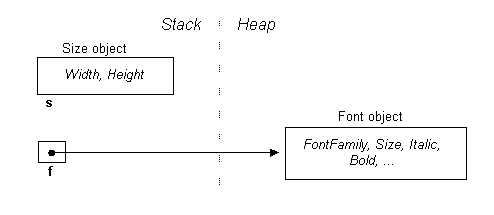
image004.gif

and we'll also create a form.  Form is a class in System.Windows.Forms namespace, and is hence a reference type:
Form myForm = new Form();
To set the form's size and font, we can assign the objects s and f to the form via its properties:
myForm.Size = s;
myForm.Font = f;

Here's what it now looks like in memory:
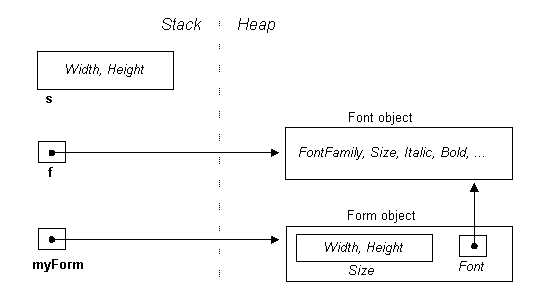
image006.gif

As you can see, with s, we've copied over its contents, while in the case of f, we've copied over its reference (resulting in two pointers in memory to the same Font object).  This means that changes made via s will not affect the form, while changes made via f, will.

Fun with Structs

We've made a slightly simplifying assumption in the diagrams in that Size and Font are depicted as fields in the Form class.  More accurately, they are properties, which are facades for internal representations we don't get to see.  We can imagine their definitions look something like this:
class Form
{
      // Private field members
      Size size;
      Font font;
      // Public property definitions
      public Size Size
      {
            get    { return size; }
            set    { size = value; fire resizing events }
      }
      public Font Font
      {
            get    { return font;  }
            set    { font = value; }
      }
}
By using properties, the class has an opportunity to fire events when the form's size or font changes.  It provides further flexibility in that other size-related properties, such as ClientSize (the size of a control's internal area without title bar, borders, or scroll bars) can work in tandem with the same private fields.
But there is a snag.  Suppose we want to double the form's height, through one of its properties.  It would seem reasonable to do this :
myForm.ClientSize.Height = myForm.ClientSize.Height * 2;
or more simply:
myForm.ClientSize.Height *= 2;
However, this generates a compiler error:
Cannot modify the return value of 'System.Windows.Forms.Form.ClientSize' because it is not a variable
We get the same problem whether we use Size or ClientSize.  Let's look at why.
Imagine ClientSize as a public field rather than a property.  The expression myForm.ClientSize.Height would then simply reach through the membership hierarchy in a single step and access the Height member as expected.  But since ClientSize is a property, myForm.ClientSize is first evaluated (using the property's get method), returning an object of type Size.  And because Size is a struct (and hence a value-type) what we get back is a copy of the form's size.  And it's this copy whose size we double!  C# realizes our mistake, and generates an error rather than compiling something that it knows won't work.  (Had Size been defined instead as a class, there would have been no problem, since ClientSize
's get accessor would have returned a reference, giving us access to the form's real Size object.)
So how then do we change the form's size?  You have to assign it a whole new object:
myForm.ClientSize = new Size
  (myForm.ClientSize.Width, myForm.ClientSize.Height * 2);
There's more good news in that with most controls we usually size them via their external measurements (Size rather than ClientSize) and for these we also have ordinary integer Width and Height properties that we can get and set!

View on the web
Inoreader is a light and fast RSS Reader. Follow us on Twitter and Facebook.
Read More
by · No comments :

C# in Depth: Implementing the Singleton Pattern


Via Web page

Table of contents (for linking purposes...)

The singleton pattern is one of the best-known patterns in software engineering. Essentially, a singleton is a class which only allows a single instance of itself to be created, and usually gives simple access to that instance. Most commonly, singletons don't allow any parameters to be specified when creating the instance - as otherwise a second request for an instance but with a different parameter could be problematic! (If the same instance should be accessed for all requests with the same parameter, the factory pattern is more appropriate.) This article deals only with the situation where no parameters are required. Typically a requirement of singletons is that they are created lazily - i.e. that the instance isn't created until it is first needed.
There are various different ways of implementing the singleton pattern in C#. I shall present them here in reverse order of elegance, starting with the most commonly seen, which is not thread-safe, and working up to a fully lazily-loaded, thread-safe, simple and highly performant version.
All these implementations share four common characteristics, however:
  • A single constructor, which is private and parameterless. This prevents other classes from instantiating it (which would be a violation of the pattern). Note that it also prevents subclassing - if a singleton can be subclassed once, it can be subclassed twice, and if each of those subclasses can create an instance, the pattern is violated. The factory pattern can be used if you need a single instance of a base type, but the exact type isn't known until runtime.
  • The class is sealed. This is unnecessary, strictly speaking, due to the above point, but may help the JIT to optimise things more.
  • A static variable which holds a reference to the single created instance, if any.
  • A public static means of getting the reference to the single created instance, creating one if necessary.
Note that all of these implementations also use a public static property Instance as the means of accessing the instance. In all cases, the property could easily be converted to a method, with no impact on thread-safety or performance.

public sealed class Singleton
{
    private static Singleton instance=null;
    private Singleton()
    {
    }
    public static Singleton Instance
    {
        get
        {
            if (instance==null)
            {
                instance = new Singleton();
       &nbsp ;    }
            return instance;
        }
    }
}
As hinted at before, the above is not thread-safe. Two different threads could both have evaluated the test if (instance==null) and found it to be true, then both create instances, which violates the singleton pattern. Note that in fact the instance may already have been created before the expression is evaluated, but the memory model doesn't guarantee that the new value of instance will be seen by other threads unless suitable memory barriers have been passed.
public sealed class Singleton
{
    private static Singleton instance = null;
    private static readonly object padlock = new object();
    Singleton()
    {
    }
    public static Singleton Instance
    {
        get
        {
            lock (padlock)
            {
       & nbsp;        if (instance == null)
                {
                    instance = new Singleton();
                }
                return instance;
            }
        }
    }
}
This implementation is thread-safe. The thread takes out a lock on a shared object, and then checks whether or not the instance has been created before creating the instance. This takes care of the memory barrier issue (as locking makes sure that all reads occur logically after the lock acquire, and unlocking makes sure that all writes occur logically before the lock release) and ensures that only one thread will create an instance (as only one thread can be in that part of the code at a time - by the time the second thread enters it,the first thread will have created the instance, so the expression will evaluate to false). Unfortunately, performance suffers as a lock is acquired every time the instance is requested.
Note that instead of locking on typeof(Singleton) as some versions of this implementation do, I lock on the value of a static variable which is private to the class. Locking on objects which other classes can access and lock on (such as the type) risks performance issues and even deadlocks. This is a general style preference of mine - wherever possible, only lock on objects specifically created for the purpose of locking, or which document that they are to be locked on for specific purposes (e.g. for waiting/pulsing a queue). Usually such objects should be private to the class they are used in. This helps to make writing thread-safe applications significantly easier.

public sealed class Singleton
{
    private static Singleton instance = null;
    private static readonly object padlock = new object();
    Singleton()
    {
    }
    public static Singleton Instance
    {
        get
        {
            if (instance == null)
            {
 &nb sp;              lock (padlock)
                {
                    if (instance == null)
                    {
                        instance = new Singleton();
                    }
                }
    & nbsp;       }
            return instance;
        }
    }
}
This implementation attempts to be thread-safe without the necessity of taking out a lock every time. Unfortunately, there are four downsides to the pattern:
  • It doesn't work in Java. This may seem an odd thing to comment on, but it's worth knowing if you ever need the singleton pattern in Java, and C# programmers may well also be Java programmers. The Java memory model doesn't ensure that the constructor completes before the reference to the new object is assigned to instance. The Java memory model underwent a reworking for version 1.5, but double-check locking is still broken after this without a volatile variable (as in C#).
  • Without any memory barriers, it's broken in the ECMA CLI specification too. It's possible that under the .NET 2.0 memory model (which is stronger than the ECMA spec) it's safe, but I'd rather not rely on those stronger semantics, especially if there's any doubt as to the safety. Making the instance variable volatile can make it work, as would explicit memory barrier calls, although in the latter case even experts can't agree exactly which barriers are required. I tend to try to avoid situations where experts don't agree what's right and what's wrong!
  • It's easy to get wrong. The pattern needs to be pretty much exactly as above - any significant changes are likely to impact either performance or correctness.
  • It still doesn't perform as well as the later implementations.
public sealed class Singleton
{
    private static readonly Singleton instance = new Singleton();
 
 
    static Singleton()
    {
    }
    private Singleton()
    {
    }
    public static Singleton Instance
    {
        get
        {
            return instance;
        }
&nbsp ;   }
}
As you can see, this is really is extremely simple - but why is it thread-safe and how lazy is it? Well, static constructors in C# are specified to execute only when an instance of the class is created or a static member is referenced, and to execute only once per AppDomain. Given that this check for the type being newly constructed needs to be executed whatever else happens, it will be faster than adding extra checking as in the previous examples. There are a couple of wrinkles, however:
  • It's not as lazy as the other implementations. In particular, if you have static members other than Instance, the first reference to those members will involve creating the instance. This is corrected in the next implementation.
  • There are complications if one static constructor invokes another which invokes the first again. Look in the .NET specifications (currently section 9.5.3 of partition II) for more details about the exact nature of type initializers - they're unlikely to bite you, but it's worth being aware of the consequences of static constructors which refer to each other in a cycle.
  • The laziness of type initializers is only guaranteed by .NET when the type isn't marked with a special flag called beforefieldinit. Unfortunately, the C# compiler (as provided in the .NET 1.1 runtime, at least) marks all types which don't have a static constructor (i.e. a block which looks like a constructor but is marked static) as beforefieldinit. I now have an article with more details about this issue. Also note that it affects performance, as discussed near the bottom of the page.
One shortcut you can take with this implementation (and only this one) is to just make instance a public static readonly variable, and get rid of the property entirely. This makes the basic skeleton code absolutely tiny! Many people, however, prefer to have a property in case further action is needed in future, and JIT inlining is likely to make the performance identical. (Note that the static constructor itself is still required if you require laziness.)
public sealed class Singleton
{
    private Singleton()
    {
    }
    public static Singleton Instance { get { return Nested.instance; } }
     
    private class Nested
    {
     
     
        static Nested()
        {
        }
        internal static readonly&n bsp;Singleton instance = new Singleton();
    }
}
Here, instantiation is triggered by the first reference to the static member of the nested class, which only occurs in Instance. This means the implementation is fully lazy, but has all the performance benefits of the previous ones. Note that although nested classes have access to the enclosing class's private members, the reverse is not true, hence the need for instance to be internal here. That doesn't raise any other problems, though, as the class itself is private. The code is a bit more complicated in order to make the instantiation lazy, however.
If you're using .NET 4 (or higher), you can use the System.Lazy<T> type to make the laziness really simple. All you need to do is pass a delegate to the constructor which calls the Singleton constructor - which is done most easily with a lambda expression.
public sealed class Singleton
{
    private static readonly Lazy lazy =
        new Lazy(() => new Singleton());
 
    public static Singleton Instance { get { return lazy.Value; } }
    private Singleton()
    {
    }
}
It's simple and performs well. It also allows you to check whether or not the instance has been created yet with the IsValueCreated property, if you need that.
In many cases, you won't actually require full laziness - unless your class initialization does something particularly time-consuming, or has some side-effect elsewhere, it's probably fine to leave out the explicit static constructor shown above. This can increase performance as it allows the JIT compiler to make a single check (for instance at the start of a method) to ensure that the type has been initialized, and then assume it from then on. If your singleton instance is referenced within a relatively tight loop, this can make a (relatively) significant performance difference. You should decide whether or not fully lazy instantiation is required, and document this decision appropriately within the class.
A lot of the reason for this page's existence is people trying to be clever, and thus coming up with the double-checked locking algorithm. There is an attitude of locking being expensive which is common and misguided. I've written a very quick benchmark which just acquires singleton instances in a loop a billion ways, trying different variants. It's not terribly scientific, because in real life you may want to know how fast it is if each iteration actually involved a call into a method fetching the singleton, etc. However, it does show an important point. On my laptop, the slowest solution (by a factor of about 5) is the locking one (solution 2). Is that important? Probably not, when you bear in mind that it still managed to acquire the singleton a billion times in under 40 seconds. (Note: this article was originally written quite a while ago now - I'd expect better performance now.) That means that if you're "only" acquiring the singleton four hundred thousand ti mes per second, the cost of the acquisition is going to be 1% of the performance - so improving it isn't going to do a lot. Now, if you are acquiring the singleton that often - isn't it likely you're using it within a loop? If you care that much about improving the performance a little bit, why not declare a local variable outside the loop, acquire the singleton once and then loop. Bingo, even the slowest implementation becomes easily adequate.
I would be very interested to see a real world application where the difference between using simple locking and using one of the faster solutions actually made a significant performance difference.
Sometimes, you need to do work in a singleton constructor which may throw an exception, but might not be fatal to the whole application. Potentially, your application may be able to fix the problem and want to try again. Using type initializers to construct the singleton becomes problematic at this stage. Different runtimes handle this case differently, but I don't know of any which do the desired thing (running the type initializer again), and even if one did, your code would be broken on other runtimes. To avoid these problems, I'd suggest using the second pattern listed on the page - just use a simple lock, and go through the check each time, building the instance in the method/property if it hasn't already been successfully built.
Thanks to Andriy Tereshchenko for raising this issue.
There are various different ways of implementing the singleton pattern in C#. A reader has written to me detailing a way he has encapsulated the synchronization aspect, which while I acknowledge may be useful in a few very particular situations (specifically where you want very high performance, and the ability to determine whether or not the singleton has been created, and full laziness regardless of other static members being called). I don't personally see that situation coming up often enough to merit going further with on this page, but please mail me if you're in that situation.
My personal preference is for solution 4: the only time I would normally go away from it is if I needed to be able to call other static methods without triggering initialization, or if I needed to know whether or not the singleton has already been instantiated. I don't remember the last time I was in that situation, assuming I even have. In that case, I'd probably go for solution 2, which is still nice and easy to get right.
Solution 5 is elegant, but trickier than 2 or 4, and as I said above, the benefits it provides seem to only be rarely useful. Solution 6 is a simpler way to achieve laziness, if you're using .NET 4. It also has the advantage that it's obviously lazy. I currently tend to still use solution 4, simply through habit - but if I were working with inexperienced developers I'd quite possibly go for solution 6 to start with as an easy and universally applicable pattern.
(I wouldn't use solution 1 because it's broken, and I wouldn't use solution 3 because it has no benefits over 5.)
View on the web
Inoreader is a light and fast RSS Reader. Follow us on Twitter and Facebook.
Read More